Upland, San Bernardino County
Access Control Systems in Upland
Short answer: If an access-controlled door in Upland won't release, won't relock or rejects good cards, the cause is usually power, door alignment, the lock hardware or a programming change, not the whole system. A locksmith who works on both the door and the electronics can trace it methodically. Call (951) 903-3193, describe the symptom and the brand on the reader, and we'll quote the service visit.
Apartment and HOA properties in Upland live and die by their entry points: the pedestrian gate by the mailboxes, the vehicle gate, the pool, the gym, the package room and the leasing office. When one of those stops working, residents notice within hours and the office phone starts ringing. Our access control work for multifamily covers telephone entry panels, fob readers, keypad gates, amenity door schedules and the mechanical locks that back them up. We can audit who still holds active fobs after years of turnover, replace failed hardware, and plan an upgrade that doesn't require reissuing every credential on the same day.
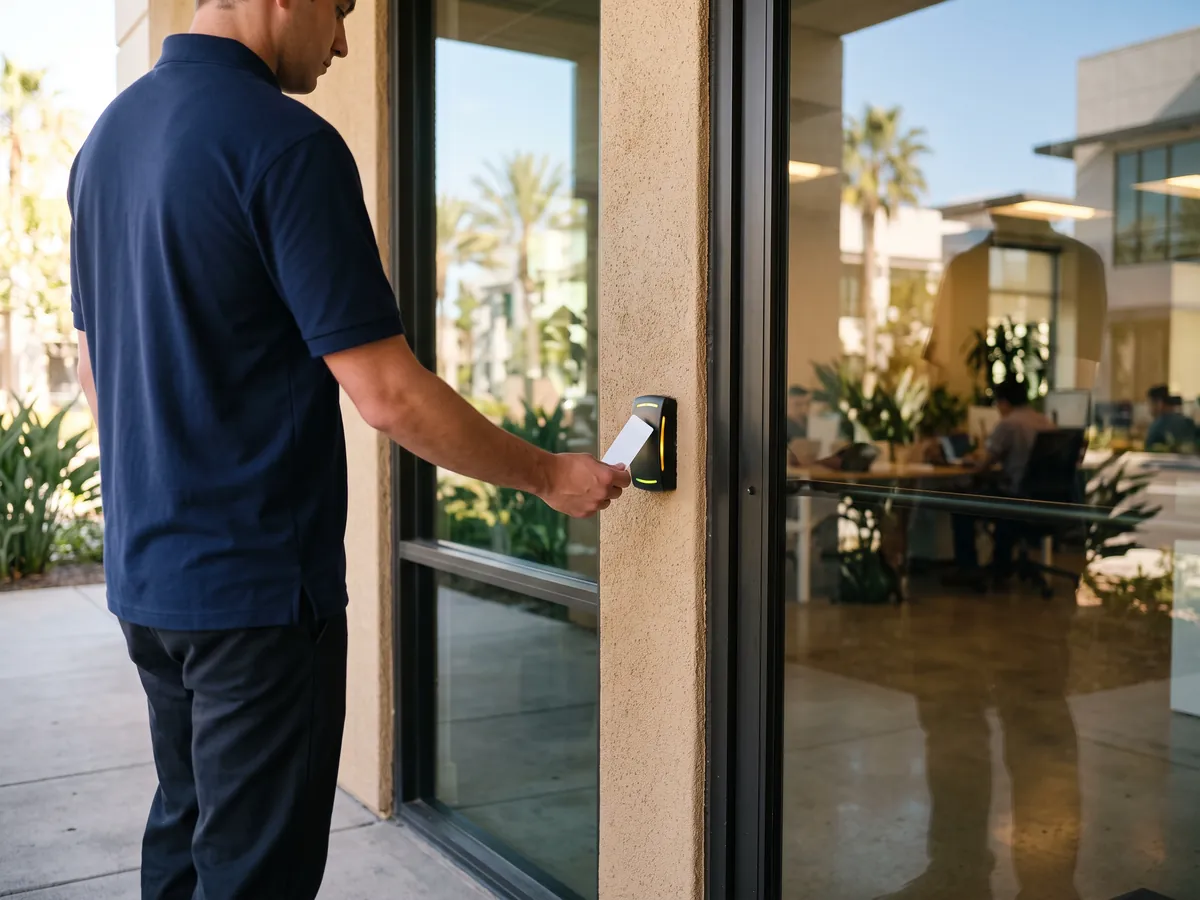
Electronic access control replaces keys with credentials: cards, fobs, codes or phones. Upland's biggest users are medical and dental offices around San Antonio Regional Hospital, apartment and condo buildings along Arrow Highway and Foothill Boulevard, office suites near Colonies Crossroads, and aviation businesses at Cable Airport. All of them share the same problem: keys are easy to lose, hard to track, and expensive to recover after an employee leaves. An access control system fixes that by letting you add or remove a credential without changing a lock. It can also build an audit trail showing who opened which door and when, which matters for offices that hold records, medication or valuable equipment. Our work covers designing a system for a building, maintaining and repairing an existing one, and upgrading outdated readers or controllers. Common repair calls include readers that stop beeping, electric strikes that buzz but do not release, power supplies that failed in the heat, and doors that will not relock because a sensor or hinge is out of position. Some projects involve fire alarm integration, networking or conduit runs. Those can belong to a contractor holding the right low-voltage license, and we will point you to one instead of overreaching.
Access Control in Upland: what to expect
Residential communities use access control differently than offices do. An office has a known roster of employees; an apartment community has hundreds of residents, their guests, delivery drivers, vendors, maintenance staff and the occasional former tenant who kept a fob. The system has to handle move-ins and move-outs every week, enforce amenity hours at the pool and gym, let a visitor call a unit from the gate, and keep fire department access in mind. In Upland, many complexes run a telephone entry panel at the vehicle gate, fob readers on pedestrian gates, and keypad or fob locks on the leasing office and mailroom. The weak spots are predictable: unencrypted fobs that residents duplicate at kiosks, entry panels that dialed out over a landline the phone company has since retired, gate locks beaten up by daily slamming, and nobody auditing the active fob list. We repair those pieces individually, or plan a phased upgrade that keeps residents moving through the gates while the work happens.
How we can help in Upland
- Standalone keypad and prox locks. Battery-powered keypad and prox locks fit a supply room, a back door or a small office suite well. They read PINs, fobs or both, relock automatically on a schedule, and record each entry. The trade-off is management: every change happens at each lock, so they stop making sense once you have more than a handful of doors.
- Networked card and fob systems. Whether the software runs on a local server or in the cloud, a networked system depends on clean work at the door: correct reader placement, door position switches, request-to-exit devices and properly sized power. That's where long-term reliability is won or lost, and it's where a locksmith background matters most.
- Access control repair and troubleshooting. Many access failures are mechanical, not electronic: a sagging door that drags its latch against the strike keeper, a closer too weak to pull the door into a maglock, an override cylinder that seized because nobody used it for years. Those are standard locksmith fixes, and they often solve what looked like an expensive electronics problem.
- Upgrades and credential migration. If your access control software runs on an old desktop under someone's desk, or the manufacturer stopped issuing updates, it's time to plan an upgrade. Often the door hardware, wiring and power supplies are fine to keep. We replace the controller and software, migrate the user list where possible, and keep the doors working throughout.
- User management, remote access and audit trails. We set up user groups, door schedules, holiday calendars and administrator accounts, then train your staff on daily tasks: adding a new hire, disabling a lost fob, releasing a door remotely for a delivery and exporting entry reports. Clear roles keep one person's login from becoming a single point of failure.
Local factors in Upland
Retail stores along Arrow Highway usually need fewer controlled doors but tighter control of each one: the rear service door, stockroom, cash office and sometimes a pharmacy or electronics cage. Aluminum storefront doors need strikes designed for narrow stiles, and rear doors need panic hardware that still meets egress rules. We set schedules around opening and closing shifts and alerts when the back door opens outside receiving hours.
Older apartment buildings and commercial properties from the 1960s and 1970s in Upland bring their own challenges: plaster or block walls, doors that have sagged for decades, and frames never prepped for electrified hardware. Wireless locks, surface raceway and careful door repair make access control practical without tearing the building apart. We often fix hinges, closers and frames first, because new electronics won't work on a door that doesn't close properly.
Clinics, dental offices and medical buildings need access records for medication rooms, records storage and staff-only corridors, plus front doors that unlock for patients only during office hours. Many share a building near Madonna of the Trail statue at Euclid Avenue and Foothill Boulevard with other practices. We install readers and electrified locks that support detailed audit trails, set schedules around clinic hours, and make sure every controlled door still meets egress and accessibility rules.
Common situations
A dental practice near San Antonio Regional Hospital has a card system installed years ago. The front reader no longer responds, and a former employee still carries a working card. We would test the reader, wiring and power supply, replace the failed reader, and show the office manager how to deactivate the missing credential in the controller software. If the system is an old proprietary model with no software support, we would explain the upgrade options.
- Take a small engineering firm whose access control software lives on a desktop PC that finally won't boot. The three readers and electric strikes still work, so existing cards open the doors, but nobody can add a new hire or delete a lost badge. A typical fix keeps the readers and strikes, replaces the controller with a cloud-managed one, re-enrolls the existing cards and hands the owner a working admin login.
- A typical multifamily call: the telephone entry panel at a complex off San Antonio Avenue has stopped calling residents. Guests and delivery drivers are stuck at the gate, and the leasing office is buzzing people in by hand. In cases like this, the panel itself is often fine; the phone company has retired the copper line it dialed out on. Moving the panel to a cellular or internet connection usually restores calling without replacing the hardware.
- For example, a property manager notices far more active fobs than residents. It turns out residents have been copying their 125 kHz fobs at a mall kiosk for roommates, dog walkers and house cleaners. Because those fobs carry no encryption, the copies look identical to the originals. A phased upgrade to encrypted fobs read by multi-technology readers would let the property reissue credentials building by building, then disable the old format.
Step by step with Julian's Locksmith
- Start with a call. Call (951) 903-3193 and describe what you need: a new system, a repair, an upgrade or maintenance. Tell us how many doors or gates are involved, the brand on the reader or keypad if there is one, and what the door does now when someone presents a credential.
- Site walk and assessment. For upgrades we inventory what's already installed: reader models and card formats, controller brand and firmware, wiring type, electrified hardware and battery age. That inventory shows which pieces still have years left in them and which ones are holding the whole system back.
- Written quote and options. You get a written quote before work begins, with each door listed and the hardware named. Where there's a real choice, such as standalone versus networked or prox versus encrypted credentials, we price both and explain the trade-offs so the decision is yours.
- Hardware work at the door. When repairing, we replace only what failed and correct whatever caused it. A burned-out strike is often the symptom of a missing suppression diode, a misaligned keeper or the wrong voltage. Fixing the cause keeps the replacement from failing the same way next season.
- Programming and handoff. We document the system in plain terms: where the controller and power supplies sit, which breaker feeds them, where override keys are kept and how each door behaves when power fails. That sheet belongs with your building records, not in our van.
- Ongoing service and support. Plan for the hours we're closed. Know where the override keys are, how to secure any door that relies on a maglock, and who can log into the software. If a door fails late at night, those three things keep the building secure until we're back at 6:30 a.m.
How we quote the job
- Credential technology. How many credentials you need, and how often you replace them, matters as much as their unit cost. A business with steady staff buys cards once. An apartment community replacing lost fobs every week should factor ongoing credential costs, and perhaps a replacement fee policy, into its decision.
- Software and subscription model. Integration adds software cost. Tying access events to video cameras, an intrusion alarm or HR records requires compatible platforms and sometimes extra licenses. If you don't need integration now, we choose hardware that can support it later without making you pay for it on day one.
- Repair scope and parts availability. Repair costs depend on what failed and whether parts are still made. A misaligned strike or a dead battery is a short visit. A discontinued controller board can mean hunting for compatible stock or replacing the controller. We diagnose first, quote the repair, and only proceed with your approval.
Every job gets a clear quote before any work starts. Call (951) 903-3193 with the details and we'll tell you what to expect for your situation in Upland.
Mistakes to avoid
- Putting a fail-safe strike on a fire-rated door. Fire doors must latch positively when power fails, so electrified hardware on them has to be fail-secure and listed for fire doors. A fail-safe strike unlatches during an outage or alarm, which defeats the whole purpose of the door's rating.
- Installing a maglock without code-compliant egress. A maglock holds the door until power drops, so people inside need a motion sensor, a push-to-exit button and a fire alarm release to get out. Skipping any of those creates a life-safety hazard and a likely inspection failure.
- Treating 125 kHz prox as secure. These cards broadcast a fixed number with no encryption, and inexpensive devices can copy one from a short distance. If your property still relies on them for perimeter doors, assume copies exist and plan an upgrade rather than ordering more of the same cards.
What to do before we arrive
- Review the user list every quarter. Export it, sort by last access date, and question anyone who hasn't used a door in months. Dormant credentials usually belong to former employees, contractors or residents whose deletion was missed. It takes a few minutes and closes the most common gap.
- Rotate keypad codes and clean the buttons. On a busy keypad, the digits in the code wear shiny or grimy while the rest stay clean, which narrows a guess considerably. Changing codes regularly, using longer PINs or choosing a scramble-pad keypad keeps wear patterns from giving the code away.
- Shade or relocate readers and keypads that face the afternoon sun. Inland heat fades keypad legends, cracks plastic housings and drains standalone lock batteries faster. A small hood, a north-facing mount or a pedestal under an overhang can add years to the hardware at very little cost.
- Use door-held-open alerts. A door position switch costs little compared with what walks out of a propped door. Set a reasonable delay so deliveries don't trigger constant alerts, then route notifications to a person who will actually check, not a shared inbox nobody reads.
Service in Upland
Upland is about 24 miles from our San Bernardino base, roughly 30 minutes in light traffic via Belmont and Palm Avenues to I-215 North, I-15 South at the Devore junction. When you call, you get an arrival estimate based on where the technician is and the traffic at that moment.
Homes and businesses just off Campus Avenue are routine stops for us. Give the suite or unit number and any gate instructions, and say whether the van can park out front or should pull into a side lot.
About Upland: The name Upland was borrowed from the Upland Citrus Association, one of the groups that packed and shipped fruit from the area's groves.
| Neighborhoods | Central Upland, The Colonies at San Antonio, North Upland, Upland Hills Estates, Old Magnolia, Euclid Avenue Historic District |
|---|---|
| ZIP codes | 91784, 91786 |
| Main routes | I-10, SR-210, Foothill Boulevard, Euclid Avenue |
| From our San Bernardino base | about 24 miles via Belmont and Palm Avenues to I-215 North, I-15 South at the Devore junction, then SR-210 West (Foothill Freeway) to the Campus Avenue or Mountain Avenue exits; for south Upland and downtown, I-15 South to I-10 West and the Euclid Avenue or Mountain Avenue exits |
Business lock or door work in Upland?
Call (951) 903-3193 with the address, the doors or hardware involved and when the site is open. We'll quote the job before any work starts and book a time within our hours that suits your schedule.
Frequently asked questions
Keypad, card or phone: which credential should we use?
Keypads are inexpensive to run, but codes get shared. Cards and fobs identify each person and are quick at busy doors. Phone credentials avoid lost plastic and are easy to issue remotely, but depend on charged phones. Many Upland businesses use cards or fobs for staff, a keypad for limited vendor access and card plus PIN at sensitive rooms.
How do I stop a former employee from getting in?
Disable their credential in the access control software right away, then check whether they knew any shared keypad codes or held mechanical keys. Change shared codes, recover or rekey for missing keys, and review the audit trail for entries after their departure. If you can't log into your system, call us and we'll help regain admin access after verifying your authority.
Can you add access control to the doors I already have?
Usually, yes. Most commercial doors can accept an electric strike, an electrified lock or a maglock, and many standalone keypad locks fit standard door preps. Fire-rated doors, glass doors and doors in poor condition need more planning. We inspect each door during the site walk and tell you what it needs, including any repairs required first.
Do you do the wiring, or do I need an electrician?
We handle the door-side wiring and low-voltage connections that are part of typical locksmith access control work. Projects that need new 120-volt circuits, extensive cable through finished construction, fire alarm interfaces or network infrastructure may require a licensed electrical, low-voltage or fire alarm contractor. We tell you upfront and coordinate, so you aren't managing several trades alone.
Can key fobs be copied?
Older 125 kHz proximity fobs and cards can be copied easily because they transmit an unencrypted number, which is why some apartment residents in Upland get copies made at kiosks. Encrypted 13.56 MHz credentials, such as MIFARE DESFire EV2 or EV3 and HID Seos, are designed to resist copying. If your system still uses old prox, upgrading to encrypted credentials closes that gap.
What if our system fails while you're closed?
We're open every day from 6:30 a.m. to 11:30 p.m. If a door fails outside those hours, use the mechanical key override to lock or open it. A maglocked door that has lost power has no lock of its own, so restore power at the supply if you safely can or keep that entrance attended, then call us when we open.
How far is Upland from your base?
Upland is about 24 miles from our San Bernardino base, roughly 30 minutes in light traffic. Arrival time depends on traffic and on the job the technician is finishing, so we give you an estimate on the phone before you commit.
Related services in Upland
Access Control in nearby cities
- Access Control in ClaremontLos Angeles County
- Access Control in MontclairSan Bernardino County
- Access Control in Rancho CucamongaSan Bernardino County
- Access Control in OntarioSan Bernardino County
- Access Control in La VerneLos Angeles County
- Access Control in PomonaLos Angeles County
- Access Control in ChinoSan Bernardino County
- Access Control in EtiwandaSan Bernardino County